

How to Tell If an Office Chair Fits Your Body: Quick Answer and Overview
A properly fitting office chair supports your spine, allows your feet to rest flat on the floor, and keeps your elbows at 90 degrees when typing. The seat height should position your knees at a right angle, with 1-2 inches of space between the seat edge and the back of your knees. Your lower back should touch the lumbar support, and your shoulders should remain relaxed. Most ergonomic office chairs in 2026 offer adjustable height, tilt tension, and armrest positioning to accommodate different body types. Testing these adjustments before purchasing ensures long-term comfort and prevents back pain, neck strain, and repetitive stress injuries.

Finding the right office chair involves more than aesthetics. Your body spends 8+ hours daily in this chair, making proper fit essential for health and productivity. Incorrect chair dimensions lead to poor posture, muscle tension, and chronic pain conditions. This guide walks you through every measurement and adjustment point to evaluate whether an office chair truly fits your unique body proportions. You’ll learn specific ergonomic standards and practical testing methods to use before buying.
Key Takeaway: A well-fitting office chair maintains neutral spine alignment, supports your feet, and adjusts to your body’s exact dimensions.
What Are the Critical Measurements for Office Chair Fit?
Office chair fit depends on precise measurements between your body and the chair’s dimensions. The most critical measurements include seat height, seat depth, seat width, backrest height, and armrest positioning. Each measurement directly impacts how well the chair supports your posture and comfort level throughout the workday.

Seat height is the foundation of proper fit. When sitting with your feet flat on the floor, your knees should form a 90-degree angle. Your thighs should be parallel to the ground, not tilted up or down. Most people require a seat height between 16 and 21 inches from the floor, but this varies based on your height. Measure from the back of your heel to the crease behind your knee to determine your ideal seat height.
Essential Measurements to Check
- Seat height: knees at 90 degrees with feet flat on floor.
- Seat depth: 1-2 inches space between seat edge and back of knees.
- Seat width: 1-2 inches clearance on each side of your hips.
- Backrest height: supports your entire spine from tailbone to shoulder blades.
- Armrest height: elbows at 90 degrees when arms rest on them.
Seat depth affects how your thighs rest on the cushion. A seat that’s too deep pushes the edge into the back of your knees, cutting off circulation. A seat that’s too shallow doesn’t support your thighs properly. The ideal seat depth allows 1-2 inches of clearance between the seat edge and the back of your knees when you sit with your back against the backrest.
Key Takeaway: Precise measurements ensure your chair supports proper posture and prevents circulation problems.
How Do You Test Lumbar Support and Spinal Alignment?
Lumbar support is the most important factor for preventing back pain. Your lower back has a natural inward curve called lordosis. A proper office chair supports this curve, preventing slouching and strain on spinal discs. When you sit, your lower back should touch the lumbar support without forcing an unnatural arch.
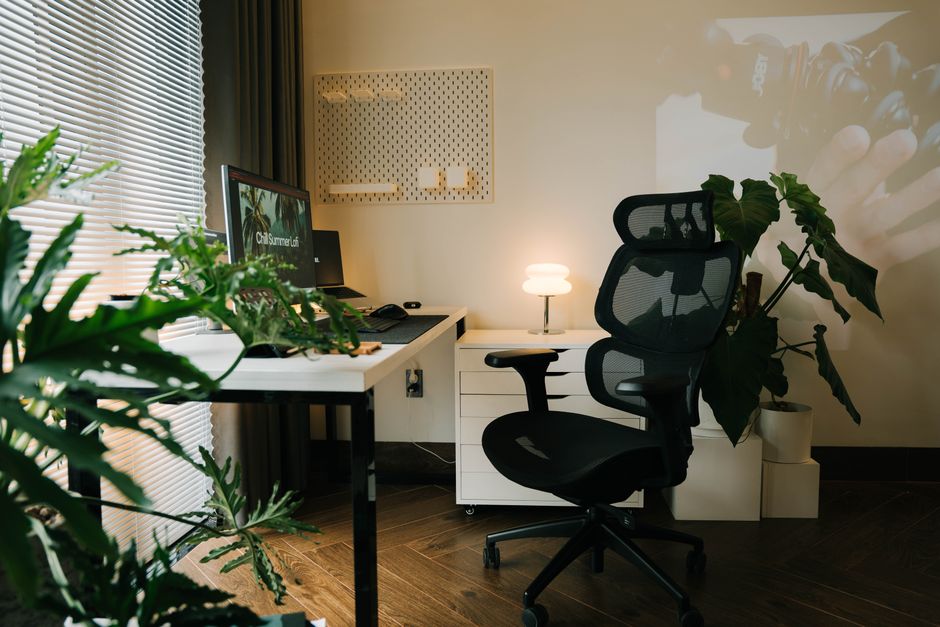
To test lumbar support, sit in the chair with your back fully against the backrest. Place your hand between your lower back and the chair. You should feel slight contact, not pressure or gaps. If your hand fits too easily, the support is insufficient. If you can’t fit your hand, the support is too aggressive. The best chairs offer adjustable lumbar support that moves up and down to match your spine’s exact curve.
Testing Spinal Alignment
Your entire spine should maintain a neutral S-curve when sitting. This means your head stays above your shoulders, your shoulders above your hips, and your hips above your knees. Tilt your head back slightly—if you’re looking at the ceiling, the backrest is too reclined. Your eyes should look straight ahead at your monitor. Many office chairs in 2026 include adjustable backrests that tilt forward and backward to maintain this alignment.
The backrest height matters significantly. It should support your entire back, not just your lower spine. Ideally, the backrest extends to your shoulder blade level. If it ends below your mid-back, you’ll experience upper back and neck strain. Test this by sitting and checking if your shoulders feel supported and relaxed, not hunched or pulled backward.
Key Takeaway: Proper lumbar support prevents lower back pain by maintaining your spine’s natural curve.
Are Your Feet and Legs Positioned Correctly in the Office Chair?
Many people overlook foot and leg positioning, but this affects your entire postural chain. Your feet should rest flat on the floor or footrest with your weight distributed evenly. Dangling feet cause swelling, reduce circulation, and shift weight to your lower back. If your feet don’t reach the floor, you need a footrest or a lower chair height.

Check your leg angle by sitting in the chair and looking down. Your thighs should be parallel to the ground, not tilted up toward your chest or sloping downward. If your thighs tilt up, the seat is too high. If they slope downward, the seat is too low. Adjust the height until your thighs are perfectly horizontal. This position distributes your weight evenly and prevents pressure on your sit bones.
Footrest and Floor Contact Options
- Feet flat on floor: ideal for most people with average leg length.
- Footrest: necessary if seat height prevents floor contact.
- Adjustable footrest: allows angle changes for comfort variations.
- Swivel base: enables foot positioning changes throughout the day.
Circulation in your legs depends on proper positioning. When your feet dangle, the seat edge cuts off blood flow to your thighs and calves. This causes numbness, tingling, and swelling by day’s end. A proper chair height allows your feet to rest naturally, maintaining healthy circulation throughout your 8-hour workday. If your current chair doesn’t accommodate your leg length, investing in a footrest solves the problem affordably.
Key Takeaway: Feet flat on the floor with parallel thighs ensures proper circulation and weight distribution.
What Armrest Adjustments Indicate Proper Fit?
Armrests should support your arms without forcing your shoulders up or down. When your arms rest on the armrests, your elbows should form a 90-degree angle. Your shoulders should feel relaxed and neutral, not hunched toward your ears or dropped down. Many people ignore armrests, but they significantly reduce shoulder and neck strain during typing and mouse work.

Test armrest height by sitting upright with your arms at your sides. The armrests should be level with your elbows. If you have to reach up to rest your arms, the armrests are too high. If you have to drop your shoulders, they’re too low. The best office chairs offer 3D adjustable armrests that move up and down, forward and backward, and rotate slightly. This flexibility accommodates different desk heights and work tasks.
Armrest Width and Clearance
Armrest width affects how well they support your arms and whether they fit under your desk. The armrests should be close enough to support your arms but not so wide that they hit your desk or restrict your movement. When sitting at your desk with the chair pushed in, your armrests should not interfere with your work surface. Test this by simulating your typical typing position and checking for any contact points.
Removable armrests offer flexibility for different work situations. Some people prefer no armrests for maximum mobility, while others rely on them for support. Modern office chairs in 2026 often feature detachable or flip-up armrests, allowing you to customize your setup. If you plan to move the chair between different desks, adjustable armrests provide the most versatility.
Key Takeaway: Properly positioned armrests at elbow height reduce shoulder and neck strain during work.
How Do You Evaluate Seat Cushion Comfort and Material?
Seat cushion quality directly impacts comfort during long work sessions. The cushion should be firm enough to support your weight without feeling hard, and soft enough to reduce pressure on your sit bones. Memory foam, high-density foam, and mesh materials each offer different benefits. Memory foam molds to your body shape, while mesh allows air circulation for temperature regulation.
Test cushion firmness by sitting in the chair for at least 10-15 minutes before deciding. Your initial impression may differ from how it feels after extended sitting. A cushion that feels comfortable for 5 minutes might cause discomfort after an hour. Look for cushions that maintain consistent support without bottoming out or feeling too soft. The best cushions compress slightly under your weight but don’t allow you to feel the chair frame beneath.
Material Considerations for Different Environments
- Memory foam: contours to body shape, retains heat in warm environments.
- High-density foam: provides firm support, maintains shape over time.
- Mesh fabric: breathable, ideal for hot offices, shows dust easily.
- Leather or vinyl: durable, easy to clean, less breathable than fabric.
- Fabric upholstery: comfortable, absorbs moisture, requires regular cleaning.
Material choice depends on your office environment and personal preferences. In warm offices, mesh seats prevent heat buildup and sweating. In cold environments, fabric or leather provides insulation. Consider your climate and whether you’ll be wearing the same clothes throughout the day. Some people develop pressure points with certain materials, so testing different options helps identify your ideal choice.
Key Takeaway: Cushion firmness and material affect both immediate comfort and long-term support during work hours.
What Adjustability Features Indicate a Well-Fitting Office Chair?
A chair that fits one person perfectly may not fit another due to individual body variations. Adjustability features allow you to customize the chair to your exact specifications. The most important adjustable features include seat height, lumbar support, tilt tension, and armrests. A truly ergonomic office chair offers multiple adjustment points to accommodate different body types and work preferences.
Seat height adjustment is non-negotiable. Most office chairs feature pneumatic height adjustment using a lever or gas cylinder. Test the adjustment mechanism to ensure it’s smooth and holds your desired height without slipping. Some budget chairs have poor-quality cylinders that gradually descend over time, requiring constant readjustment. Premium chairs maintain consistent height indefinitely.
Critical Adjustability Features to Check
- Seat height: smooth pneumatic adjustment with secure locking mechanism.
- Lumbar support: moves vertically and horizontally to match spine curve.
- Tilt tension: adjusts resistance when reclining the backrest.
- Recline lock: allows backrest to stay at specific angles or recline freely.
- Armrest adjustment: 3D movement in height, depth, and angle.
Tilt tension controls how easily the chair reclines. If the tension is too tight, you can’t lean back comfortably. If it’s too loose, the chair collapses when you sit down. The ideal tilt tension allows smooth reclining while supporting your weight at any angle. Many office chairs allow you to adjust this tension with a knob or lever, enabling customization as you discover your preferred recline angle throughout the day.
Key Takeaway: Multiple adjustment features ensure the chair accommodates your body’s unique proportions and work style.
How Can You Test an Office Chair Before Purchasing?
Testing an office chair before buying prevents expensive mistakes. Visit showrooms where you can sit in chairs for extended periods. Many office furniture retailers in 2026 allow 30-day trials or have generous return policies. Online retailers often provide detailed measurement guides and customer reviews describing how chairs fit different body types. Use this information to narrow your choices before testing.
When testing a chair, bring your actual work measurements. Know your height, inseam length, torso length, and arm length. Sit in the chair with these measurements in mind, adjusting every feature to your specifications. Spend at least 15-20 minutes testing each chair. Walk around the showroom, return to the chair, and reassess your comfort level. This extended testing reveals issues that short 5-minute trials miss.
Pre-Purchase Testing Checklist
- Sit with feet flat on floor; knees should form 90-degree angle.
- Adjust seat height and verify it locks securely in place.
- Place hand between lower back and lumbar support; feel proper contact.
- Adjust armrests to elbow height; shoulders should feel relaxed.
- Test tilt tension by reclining; resistance should feel smooth.
- Verify cushion firmness after 15+ minutes of sitting.
- Check that armrests fit under your desk without interference.
Online purchases require additional research. Read reviews from people with similar body types and work requirements. Check return policies and warranty coverage. Many reputable manufacturers offer 100-night sleep trials or 30-day money-back guarantees. This reduces financial risk when buying without in-person testing. Compare multiple reviews to identify patterns about fit, durability, and comfort for your specific body type.
Key Takeaway: Extended in-person testing or detailed online research prevents purchasing chairs that don’t fit your body properly.
What Are Common Office Chair Fit Problems and Solutions?
Even with careful selection, some office chairs don’t fit perfectly. Common problems include seats that are too high or too low, insufficient lumbar support, armrests that don’t reach your elbows, and cushions that are too soft or too firm. Understanding these problems and their solutions helps you troubleshoot existing chairs or identify red flags when shopping for new ones.
A seat that’s too high causes your feet to dangle, cutting off leg circulation and straining your lower back. Solution: lower the seat height or add a footrest. A seat that’s too low forces your knees above hip level, compressing your abdomen and causing lower back pain. Solution: raise the seat height or add a cushion. Most of these problems have affordable fixes, but they indicate the chair doesn’t naturally fit your body.
Common Fit Issues and Quick Fixes
- Feet dangle: lower seat height or use a footrest platform.
- Knees too high: raise seat height or remove existing cushion.
- Insufficient lumbar support: add lumbar support pillow or adjust chair’s built-in support.
- Armrests too low: use armrest pads or purchase 3D adjustable armrests.
- Cushion too soft: add seat cushion or replace with firmer foam.
- Backrest too short: add upper back support pillow or replace chair.
If your current chair requires multiple fixes, replacement might be more cost-effective than corrections. Accumulated fixes often cost 30-50% of a new chair’s price. However, if the chair needs only one or two adjustments, accessories and modifications can extend its useful life. Evaluate whether the chair’s base structure is sound before investing in fixes.
Key Takeaway: Many fit problems have affordable solutions, but multiple issues suggest you need a different chair.
How Does Your Office Setup Affect Chair Fit?
Office chair fit depends partly on your complete workspace setup. Your desk height, monitor position, keyboard placement, and mouse location all influence how well a chair supports you. A chair that fits perfectly at one desk might feel wrong at another desk with different dimensions. When evaluating chair fit, consider your entire ergonomic setup, not just the chair alone.
Desk height should allow your elbows to rest at 90 degrees when your arms rest on the desk surface. If your desk is too high, a lower chair won’t help—you’ll still reach up to your keyboard. If your desk is too low, a higher chair won’t solve the problem—your elbows will bend more than 90 degrees. The ideal setup coordinates chair height with desk height so your arms rest naturally on the work surface.
Workspace Factors Affecting Chair Fit
- Desk height: should allow 90-degree elbow angle when typing.
- Monitor position: top of screen at or slightly below eye level.
- Keyboard placement: close enough to avoid reaching or hunching.
- Mouse location: at same height as keyboard to prevent arm strain.
- Document holder: positioned between keyboard and monitor to reduce neck rotation.
Monitor height significantly impacts neck strain and posture. If your monitor is too low, you’ll hunch forward and crane your neck downward. If it’s too high, you’ll tilt your head back, straining your upper back. The ideal position places the monitor 20-26 inches from your eyes, with the top of the screen at or slightly below eye level. A properly fitting chair combined with proper monitor positioning creates an ergonomic workspace that reduces pain and improves productivity.
Key Takeaway: Chair fit must align with your complete workspace setup, particularly desk and monitor heights.
Conclusion: How to Ensure Your Office Chair Fits Your Body Perfectly
Finding an office chair that truly fits your body requires attention to multiple factors: seat height, depth, width, lumbar support, armrest positioning, cushion quality, and adjustability features. Each measurement and adjustment point contributes to overall comfort and spinal health. By understanding these factors and testing chairs thoroughly before purchasing, you avoid expensive mistakes and invest in furniture that supports your health and productivity.
The best office chairs in 2026 offer extensive adjustability to accommodate individual body variations. No single chair fits everyone perfectly, but chairs with multiple adjustment points come closest. Combine your chair selection with proper desk and monitor positioning to create a truly ergonomic workspace. If you’re shopping for other furniture pieces, similar measurement principles apply—check out our guides on bench length for hallways, bar stool heights, and accent chairs that fit your space.
Remember that proper fit prevents long-term health problems. Back pain, neck strain, and repetitive stress injuries develop gradually from poor posture and inadequate support. Investing time in selecting a well-fitting office chair now prevents years of discomfort and potential medical expenses later. Test multiple chairs, adjust every feature, and prioritize ergonomics over aesthetics. Your body will thank you for the effort.
Key Takeaway: Proper office chair fit combines precise measurements, thorough testing, and workspace alignment to support your health and productivity.
Frequently Asked Questions
What is the ideal office chair seat height for someone 5’8″ tall?
For someone 5’8″ tall, the ideal seat height is typically 17-18 inches from the floor. However, individual proportions vary—measure from your heel to the crease behind your knee and add 1 inch for proper foot clearance. Test the height by sitting with feet flat on the floor; your knees should form a 90-degree angle. Adjust until this position feels natural and comfortable for extended periods.
How long should an office chair seat be for proper thigh support?
Seat depth should be 16-18 inches for most people, allowing 1-2 inches of clearance between the seat edge and the back of your knees. Measure from your hip to the back of your knee while sitting upright. A seat that’s too deep cuts off circulation; one that’s too shallow doesn’t support your thighs. The goal is supporting your entire thigh without pressure on the back of your knees.
Can you fix an office chair that doesn’t fit your body?
Many fit issues have affordable solutions: footrests for dangling feet, lumbar support pillows for insufficient back support, seat cushions for too-soft seats, and armrest pads for height adjustments. However, if your chair needs multiple fixes or has structural problems, replacement is often more cost-effective. Evaluate whether the chair’s base is sound before investing in accessories and modifications.
How do you know if an office chair’s lumbar support is adequate?
Sit with your back fully against the backrest and place your hand between your lower back and the chair. You should feel slight contact without pressure or gaps. The support should match your spine’s natural curve without forcing an unnatural arch. Adjustable lumbar support that moves vertically allows fine-tuning to your exact spine shape and size.
What is the proper armrest height for an office chair?
Armrests should be at elbow height when your arms hang naturally at your sides. When you rest your arms on the armrests, your elbows should form a 90-degree angle. Your shoulders should feel relaxed and neutral, not hunched or dropped. Adjustable 3D armrests allow customization for different desk heights and work tasks throughout the day.
Should office chair feet rest on the floor or a footrest?
Ideally, feet should rest flat on the floor with your thighs parallel to the ground. If your chair height prevents floor contact, a footrest is essential to maintain circulation and proper weight distribution. Never let feet dangle for extended periods, as this cuts off blood flow to your legs and shifts weight to your lower back, causing discomfort and pain.










Write Your Review
No reviews yet. Be the first to share your experience!