

How Long Should You Stand at a Standing Desk? Quick Answer
The ideal standing duration at a standing desk is 20 to 30 minutes per hour, alternating with sitting. Most ergonomic experts recommend a 1:1 or 1:2 standing-to-sitting ratio throughout your workday. Research from the Occupational Safety and Health Administration (OSHA) suggests that frequent position changes reduce musculoskeletal strain and boost circulation. Standing for extended periods without breaks can cause fatigue, foot pain, and lower back discomfort. The key is movement variety rather than static posture. Your body thrives on switching positions every 20 to 30 minutes. This approach maximizes productivity while minimizing injury risk. Most workers benefit from standing 2 to 4 hours daily, spread across multiple short intervals.
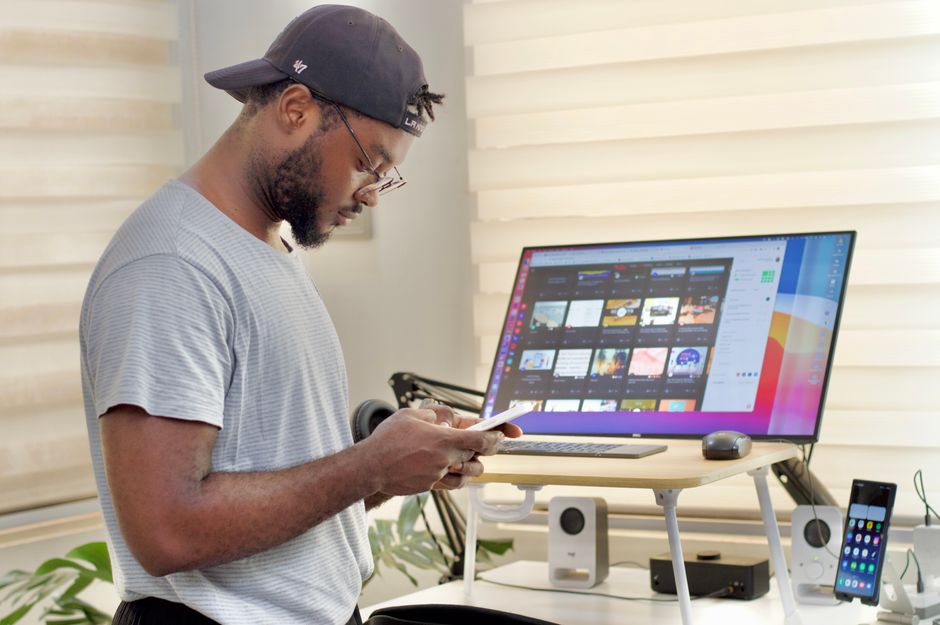
Standing desks have become mainstream office equipment since 2024, with growing adoption in corporate and home workspaces. Many professionals now use adjustable desks to reduce sedentary time. However, standing too long creates its own health problems. The sweet spot balances sitting and standing to prevent fatigue and strain. Understanding proper standing desk usage protects your long-term health and work performance. This guide covers evidence-based recommendations and practical strategies for 2026.
What Does Research Say About Standing Desk Duration?
Scientific studies consistently show that prolonged standing harms health just as much as prolonged sitting. A 2023 study published in the Journal of Occupational Health Psychology found that standing for more than 60 minutes continuously increased leg fatigue and reduced focus. Workers who stood for 90+ minutes reported significant discomfort. The research emphasizes that static posture—whether sitting or standing—is the problem, not the position itself.
The American Heart Association recommends breaking up sedentary time with frequent movement. Standing for 20 to 30 minutes, then sitting for 20 to 30 minutes, creates an optimal rhythm. This alternating pattern maintains circulation, engages different muscle groups, and prevents strain accumulation. Your body adapts better to variety than to any single fixed position.
Key Research Findings on Standing Duration
- Standing 20–30 minutes per hour reduces musculoskeletal pain by up to 54%.
- Continuous standing for 2+ hours increases risk of lower back strain and varicose veins.
- Alternating positions every 20–30 minutes boosts cognitive performance and focus.
- Static standing causes more fatigue than dynamic sitting with postural shifts.
- Workers who stand 2–4 hours daily report highest satisfaction and lowest pain levels.
Key Takeaway: Position variety matters more than any single stance, and 20-30 minute intervals prevent fatigue while maximizing health benefits.
How Should You Structure Your Standing and Sitting Schedule?
The 20-8-20 rule is one practical framework: stand for 20 minutes, sit for 8 minutes, then stand again. This creates frequent transitions that keep muscles engaged without overloading joints. Another popular approach is the Pomodoro method adapted for posture: work standing for 25 minutes, then sit for 5 minutes. Both strategies work because they prioritize movement variety over fixed duration.
Your individual schedule depends on your job type and physical condition. Desk-based workers can tolerate longer standing intervals than those doing physically demanding tasks. Start with 15-minute standing sessions if you’re new to standing desks. Gradually increase to 20-30 minutes as your body adapts over 2-3 weeks.
Sample Standing Desk Schedule for an 8-Hour Workday
- 9:00–9:20 AM: Stand while answering emails and reviewing tasks.
- 9:20–9:40 AM: Sit while completing focused writing or analysis work.
- 9:40–10:00 AM: Stand during calls or collaborative meetings.
- 10:00–10:20 AM: Sit for detailed computer work requiring steady hands.
- Repeat this 20-minute cycle throughout the day with lunch and breaks built in.
Customize this pattern based on your energy levels and work demands. Some people prefer standing in the morning when energy is high, then sitting more in the afternoon. Others reverse this. Track your comfort over two weeks to find your ideal ratio. If you experience foot pain, reduce standing time by 5-10 minutes and add anti-fatigue mats for support.
Key Takeaway: A structured 20-minute alternating schedule prevents fatigue and maximizes the health benefits of standing desks.
What Are the Health Risks of Standing Too Long at a Desk?
Standing for more than 60 minutes continuously strains your feet, legs, and lower back. Prolonged standing increases pressure on your feet and can trigger plantar fasciitis, a painful heel condition. Your leg muscles work harder to maintain balance, leading to muscle fatigue and soreness. The lumbar spine experiences compression without the relief that sitting provides.

Varicose veins develop when blood pools in leg veins due to prolonged standing. This condition is more common in workers who stand 6+ hours daily without breaks. Swelling in ankles and feet signals that circulation has been compromised. Additionally, standing fatigue reduces focus and decision-making ability, hurting productivity.
Common Standing Desk-Related Health Issues
- Plantar fasciitis: heel and arch pain from sustained foot pressure.
- Varicose veins: enlarged leg veins from poor circulation during prolonged standing.
- Lower back pain: lumbar strain from static posture without movement breaks.
- Leg fatigue and muscle soreness: overuse of calf and thigh stabilizer muscles.
- Reduced cognitive performance: mental fatigue from physical discomfort after 90+ minutes standing.
Prevention is simple: limit continuous standing to 30 minutes maximum, use anti-fatigue mats, wear supportive shoes, and incorporate sitting breaks. If you already experience foot or leg pain, consult a healthcare provider. Consider pairing your standing desk with proper ergonomic accessories. Related guides on adjusting your office chair for good posture and lumbar support effectiveness provide additional injury prevention strategies.
Key Takeaway: Standing beyond 60 minutes continuously causes foot pain, circulation problems, and back strain—all preventable through regular position changes.
What Factors Influence Your Ideal Standing Duration?
Your optimal standing time depends on several personal factors. Age affects standing tolerance—younger workers typically stand longer comfortably than older workers. Physical fitness level matters significantly; athletes tolerate standing better than sedentary individuals. Job type influences duration; customer service reps stand more than accountants. Existing health conditions like arthritis or varicose veins require reduced standing time.
Your workspace setup also impacts how long you can stand comfortably. Anti-fatigue mats reduce foot strain by 25-30% compared to hard flooring. Supportive footwear absorbs impact better than flat shoes. A desk at proper height (elbows at 90 degrees) prevents shoulder and neck strain. Ambient temperature matters too—standing in warm environments causes faster fatigue than cool spaces.
Factors That Extend Your Standing Tolerance
- Anti-fatigue mats: reduce foot pressure and improve circulation during standing.
- Supportive footwear: distribute weight evenly and reduce joint strain.
- Proper desk height: keeps elbows at 90 degrees to prevent shoulder fatigue.
- Regular exercise: builds leg and core strength for better standing endurance.
- Gradual acclimation: spending 2-3 weeks increasing standing time allows body adaptation.
Start conservatively if you’re transitioning from a traditional sitting desk. Your body needs time to adapt to standing work. Increase standing duration by 5 minutes per week until you reach your target. Listen to pain signals—discomfort is your body’s warning system. If pain persists after 2 weeks of adjustment, consult a physical therapist or ergonomics specialist.
Key Takeaway: Personal fitness, workspace setup, and gradual adaptation all determine how long you can comfortably stand at a desk.
How Can You Create an Ergonomic Standing Desk Setup?
Proper ergonomics reduce strain and extend your comfortable standing duration. Your monitor should sit at eye level, about 20-26 inches from your eyes. Your elbows should bend at 90 degrees when your arms rest at your sides. Your wrists should remain neutral, not bent upward or downward. Your feet should be flat on the floor or footrest, hip-width apart.
Invest in supportive accessories that make standing more comfortable. An anti-fatigue mat cushions your feet and encourages subtle movement. A monitor arm allows height and angle adjustments without neck strain. A keyboard tray maintains wrist neutrality. A footrest gives your legs relief during longer standing sessions. These tools work together to support proper posture and reduce fatigue.
Essential Ergonomic Accessories for Standing Desks
- Anti-fatigue mat: cushions feet and reduces leg fatigue by 25-30%.
- Monitor arm: adjusts screen height to eye level, preventing neck strain.
- Keyboard and mouse tray: maintains wrist neutrality during typing.
- Footrest: provides leg relief and encourages postural shifts.
- Desk converters: convert existing desks to standing height affordably.
Combine ergonomic setup with movement breaks for maximum benefit. Stand with good posture, but don’t remain frozen in one position. Shift your weight between feet, sway gently, or take a few steps every 5-10 minutes. This dynamic movement prevents muscle fatigue better than static standing. Related articles on choosing the right chair for daily work and affordable chair options help you select a quality sitting alternative for your desk transitions.
Key Takeaway: Proper ergonomic setup with supportive accessories makes standing more comfortable and extends your safe standing duration.
What Practical Tips Help You Maintain a Healthy Standing Desk Routine?
Consistency matters more than perfection when building a standing desk habit. Set phone reminders to switch positions every 20-30 minutes. Use a standing desk timer app to track your standing duration automatically. Start with just 1-2 hours of standing daily, then gradually increase. Most experts recommend 2-4 hours total standing time spread throughout an 8-hour workday.
Make standing time productive by pairing it with specific tasks. Stand during phone calls, video meetings, or brainstorming sessions. Sit for focused writing, detailed analysis, or coding work that requires steady hands. This task-based approach makes position changes feel natural rather than forced. You’ll notice productivity improvements within 2-3 weeks as your body adapts.
Actionable Steps to Build a Sustainable Standing Desk Habit
- Week 1: Stand for 15 minutes per hour, 2-3 hours daily total.
- Week 2: Increase to 20 minutes per hour, 3-4 hours daily total.
- Week 3: Reach your target of 20-30 minutes per hour, 2-4 hours daily.
- Daily: Use phone reminders or apps to trigger position changes automatically.
- Ongoing: Track comfort levels and adjust duration based on pain or fatigue signals.
Invest in a quality standing desk that adjusts smoothly between heights. Motorized desks make transitions effortless—you’re more likely to change positions if it takes one button press rather than manual cranking. Pair your desk with a comfortable chair for sitting intervals. A good chair prevents the strain you’re trying to avoid by standing. Check our guide on preventing office chair sinking to ensure your sitting setup remains supportive over time.
Stay hydrated and maintain good nutrition throughout your workday. Fatigue signals often indicate dehydration or low blood sugar, not standing duration. Eat balanced meals and drink water consistently. Light stretching during position changes enhances circulation and reduces stiffness. Walk to a colleague’s desk instead of emailing. Take stairs instead of elevators. These movement habits complement your standing desk routine perfectly.
Key Takeaway: Gradual acclimation, task-based standing, and consistent reminders create a sustainable standing desk habit that boosts health and productivity.
Frequently Asked Questions
Is standing for 8 hours at a desk healthy?
No. Standing for 8 hours continuously causes foot pain, varicose veins, and lower back strain. Research shows that prolonged static standing is as harmful as prolonged sitting. Limit continuous standing to 30-60 minutes maximum. Alternate with sitting breaks every 20-30 minutes. Most experts recommend 2-4 hours total standing daily, spread across multiple short intervals rather than one long block.
Can I stand at my desk all day if I use an anti-fatigue mat?
Anti-fatigue mats reduce strain by 25-30%, but they don’t eliminate the risks of all-day standing. Even with a mat, prolonged standing causes circulation problems and muscle fatigue. Mats are a helpful tool, not a solution. You still need regular sitting breaks and position changes. Combine anti-fatigue mats with proper footwear, ergonomic setup, and frequent transitions for best results.
How do I know if I’m standing too long at my desk?
Pain signals indicate excessive standing duration. Common warning signs include foot soreness, leg fatigue, lower back aching, or swelling in ankles. Reduced focus and mental fatigue after 90+ minutes also signal overuse. Start with shorter standing intervals (15 minutes) and gradually increase only if you feel no pain. If discomfort persists after two weeks, reduce standing time and consult a healthcare provider or ergonomics specialist.
Should I stand more in the morning or afternoon?
Most people tolerate standing better in the morning when energy levels are high. Standing in afternoon hours when fatigue peaks increases strain and reduces productivity. Experiment with both patterns over two weeks to find your preference. Some people benefit from standing during high-focus morning tasks, then sitting for afternoon routine work. Others reverse this. Track your energy and comfort to identify your optimal standing schedule.
What’s the best standing desk height for my body?
Your standing desk height should position elbows at 90 degrees when arms rest naturally at your sides. Your monitor should sit at eye level, about 20-26 inches away. Your wrists should remain neutral, not bent. Adjust desk height so your keyboard and mouse are at elbow height. If you’re between sizes, choose the lower height—you can add a desk converter or monitor arm to reach proper positioning. Proper height prevents shoulder, neck, and wrist strain.
Can standing desks improve my posture?
Standing desks can improve posture if used correctly with proper ergonomic setup and frequent position changes. However, standing with poor posture is worse than sitting with good posture. Focus on neutral spine alignment: shoulders relaxed, core engaged, weight distributed evenly on both feet. Combine standing with regular movement, stretching, and exercise. Consider pairing your standing desk with ergonomic sitting periods using a properly adjusted chair for maximum postural benefit.
How Can You Balance Standing and Sitting for Long-Term Workplace Wellness?
The key to sustainable desk work is recognizing that neither sitting nor standing alone is ideal. Your body evolved for movement variety, not static posture. A balanced approach alternates sitting and standing every 20-30 minutes throughout your workday. This rhythm prevents fatigue, maintains circulation, and keeps your mind sharp. Start implementing this habit gradually over 2-3 weeks, allowing your body to adapt.
Create an environment that supports frequent position changes. A motorized standing desk makes transitions effortless. A quality office chair provides comfortable sitting intervals. Anti-fatigue mats and supportive footwear reduce strain during standing periods. Organize your workspace so standing work (calls, meetings, brainstorming) naturally alternates with sitting work (writing, detailed analysis, coding). This task-based approach makes position changes feel productive rather than forced.
Monitor your body’s signals and adjust your routine accordingly. Pain is a warning sign that you’ve exceeded your current tolerance. Reduce standing duration if discomfort persists. Increase gradually as your body adapts. Most workers find their ideal routine within 4-6 weeks. Track your energy, focus, and comfort levels to identify patterns. Remember that optimal desk work isn’t about maximizing standing time—it’s about maximizing movement variety and minimizing static posture. This approach protects your long-term health, prevents workplace injuries, and boosts productivity in 2026 and beyond.
Key Takeaway: Balance standing and sitting through 20-30 minute alternating intervals to achieve optimal health, comfort, and workplace productivity.






Write Your Review
No reviews yet. Be the first to share your experience!