

What Is the Correct Standing Desk Height for Your Body?
Setting your standing desk to the correct height is essential for preventing back pain, neck strain, and fatigue. The ideal standing desk height depends on your height, arm length, and work tasks. Most experts recommend positioning your desk so your elbows bend at approximately 90 degrees while your shoulders remain relaxed. Your screen should sit at or slightly below eye level to prevent neck strain. Getting this right takes just a few minutes but pays dividends in comfort and productivity throughout your workday.
In 2026, ergonomic research continues to emphasize that proper desk height is foundational to workplace wellness. According to the Occupational Safety and Health Administration (OSHA), incorrect desk height is a leading cause of repetitive strain injuries. Many people assume a one-size-fits-all approach, but your unique proportions matter significantly. Standing desk height adjustments are one of the easiest and most impactful changes you can make to your workspace setup.
How Do You Calculate Your Ideal Standing Desk Height?
The calculation is straightforward and requires only your height and a measuring tape. Start by standing naturally with your arms at your sides. Measure from your elbow to the floor while wearing shoes—this is your critical measurement. Your standing desk surface should align with this elbow height, allowing your arms to bend at a comfortable 90-degree angle.

Here’s the step-by-step formula most ergonomic experts recommend:
- Measure distance from floor to your elbow bone while standing naturally.
- This measurement is your target desk surface height.
- Add 1-2 inches if you prefer a slightly higher position for typing.
- Subtract 1 inch if you want more wrist support for detailed work.
For reference, average standing desk heights range from 28 to 48 inches depending on user height. Someone 5’6″ typically needs 28-30 inches, while someone 6’2″ needs 30-32 inches. Electric standing desks offer precision adjustment, making this calculation easier to implement.
Key Takeaway: Your elbow height while standing is the most accurate measurement for proper desk positioning.
Using the 90-Degree Rule
The 90-degree elbow rule is the gold standard for desk height. When seated or standing at your desk, your elbows should naturally bend at approximately 90 degrees. Your forearms should be parallel to the floor or slightly angled downward toward your keyboard and mouse. This position minimizes strain on your shoulders, neck, and wrists.
Test this position by standing at your desk with relaxed shoulders. Place your hands on your keyboard. If your elbows are bent at 90 degrees and your wrists are straight, you’ve found the sweet spot. Make small adjustments if needed—even 1-2 inches can significantly impact comfort during an eight-hour workday.
Monitor Height and Viewing Distance
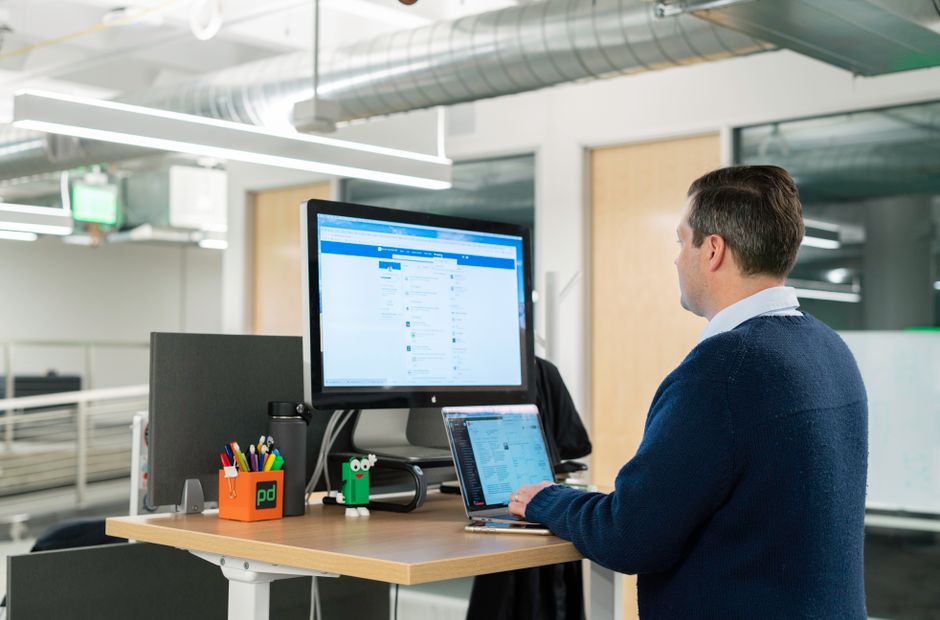
Desk surface height is only half the equation. Your monitor position is equally critical for preventing neck and eye strain. Position your screen so the top of the monitor is at or slightly below eye level. Maintain an arm’s length distance—roughly 20-26 inches from your eyes.
When looking straight ahead with relaxed posture, your gaze should naturally fall on the upper third of your screen. This prevents you from tilting your head downward, which causes neck fatigue over time. If you use multiple monitors, center your primary screen directly in front of you.
Key Takeaway: Monitor height and distance matter as much as desk height for overall ergonomic wellness.
What Are the Common Standing Desk Height Mistakes to Avoid?
Many people make predictable errors when setting up their standing desks. The most common mistake is setting the desk too high, which causes shoulder elevation and neck tension. Another frequent error is placing the monitor too low, forcing users to look down constantly. These mistakes compound over weeks and months, leading to chronic pain and reduced productivity.
Avoid these typical setup errors:
- Setting desk too high—causes shoulder shrugging and upper back strain.
- Setting desk too low—forces forward head posture and wrist flexion.
- Placing monitor too low—leads to cervical spine strain and headaches.
- Placing monitor too far away—causes eye strain and screen fatigue.
- Ignoring keyboard tray position—results in wrist and forearm pain.
- Adjusting height inconsistently—prevents your body from adapting properly.
Take time to measure correctly and test your setup before committing to a position. Many standing desk users spend weeks at an incorrect height simply because they guessed rather than measured. The five minutes spent on proper measurement prevents months of discomfort.
The Shoulder Shrug Problem
When your standing desk is too high, your shoulders naturally shrug upward to reach your keyboard. This constant elevation fatigues your trapezius muscles and creates tension that radiates into your neck and upper back. After just a few hours, you’ll notice shoulder soreness and fatigue. Over weeks, this can develop into chronic shoulder pain and tension headaches.
If you catch yourself shrugging your shoulders while working, your desk is too high. Lower it by one inch and reassess. Your shoulders should remain relaxed and neutral, hanging naturally from your arms. This simple adjustment often eliminates upper body pain within days.
Forward Head Posture Issues
When your monitor sits too low or too far away, you unconsciously lean forward and crane your neck. This forward head posture places tremendous strain on your cervical spine—studies show each inch of forward head position adds ten pounds of pressure to your neck. Over time, this causes chronic neck pain, headaches, and reduced productivity.
Position your monitor so you can see the entire screen without tilting your head. If you wear bifocals or progressive lenses, you may need to adjust monitor height slightly lower. Test your position by sitting naturally—if you feel your chin jutting forward, your monitor needs adjustment.
Key Takeaway: Proper monitor positioning is as critical as desk height for preventing neck and shoulder pain.
How Should You Adjust Your Standing Desk Throughout the Day?
The best standing desk height is the one you change regularly. Alternating between sitting and standing throughout the day distributes physical stress across different muscle groups and prevents fatigue. Most ergonomic experts recommend alternating every 30-60 minutes. If you’re new to standing desks, start with shorter standing intervals and gradually increase as your body adapts.
Create a simple standing and sitting schedule:
- Start with 15-20 minutes standing, then sit for 40 minutes.
- Gradually increase standing time by 5 minutes weekly.
- Aim for 50% standing and 50% sitting after 4-6 weeks.
- Listen to your body and adjust intervals based on comfort.
- Set phone reminders to switch positions every hour.
For more detailed guidance on standing duration and health benefits, check out our comprehensive guide on how long you should stand at a standing desk in 2026. This resource provides science-backed recommendations for optimal standing intervals and productivity strategies.
Finding Your Sitting Desk Height
When you switch to sitting, your desk height requirements change slightly. Your sitting desk should be positioned so your elbows still bend at 90 degrees, but your feet rest flat on the floor or a footrest. Your thighs should be parallel to the floor with your hips at a 90-degree angle. This position prevents lower back strain and promotes healthy circulation.
If you use a single adjustable desk, you’ll need to find a compromise height that works reasonably well for both sitting and standing. Alternatively, use a keyboard tray that adjusts independently from your main desk surface. This provides more flexibility for optimizing both positions.
Transitioning Between Positions
When switching from sitting to standing, stand up slowly and take a few seconds to adjust. Your cardiovascular system needs a moment to redistribute blood flow. Take a few deep breaths and gently roll your shoulders backward. This brief transition prevents dizziness and allows your body to settle into the standing position comfortably.
Similarly, when sitting down after standing, lower yourself slowly and adjust your monitor height if needed. These deliberate transitions help your body adapt more efficiently and reduce the shock of position changes. Over time, alternating becomes second nature and feels less disruptive to your workflow.
Key Takeaway: Alternating positions every 30-60 minutes is more important than finding the perfect single height.
What Tools and Measurements Help Set Standing Desk Height Accurately?
Several practical tools make measuring and adjusting standing desk height easier and more precise. A simple measuring tape is the most essential tool—it takes just two minutes to measure your elbow height accurately. A smartphone level app can verify that your desk surface is perfectly horizontal. Digital height gauges provide precise measurements if you want maximum accuracy.
Useful tools for standing desk setup:
- Measuring tape—measures elbow height and monitor distance quickly.
- Smartphone level app—ensures desk surface is perfectly horizontal.
- Posture mirror—helps you visualize your body alignment during work.
- Monitor arm—allows independent height adjustment from desk.
- Keyboard tray—provides additional height customization for typing surfaces.
- Footrest—improves comfort and circulation during standing periods.
Many modern standing desks include digital height displays that show exact measurements in inches or centimeters. Write down your ideal height and save it in your desk’s memory if it has preset buttons. This makes switching between sitting and standing positions quick and consistent.
Using Ergonomic Assessment Tools
Online ergonomic calculators can provide personalized recommendations based on your height and body proportions. The Humanscale ergonomic assessment tool offers detailed guidance for desk setup. These calculators account for variations in arm length and torso proportions that simple height-based formulas might miss.
Take photos of your setup from the side to evaluate your posture objectively. Compare your photos to ergonomic reference images. This visual feedback often reveals postural issues that feel normal but aren’t optimal. Adjust based on what you see in the photos, then take new photos to verify improvements.
Professional Ergonomic Assessment
If you experience persistent pain despite following setup guidelines, consider a professional ergonomic assessment. Occupational therapists and ergonomic consultants can identify individual factors affecting your comfort. They may recommend specialized equipment or modifications tailored to your specific body and work tasks.
Many employers offer ergonomic assessments as part of workplace wellness programs. If available, take advantage of this service—professional guidance often prevents costly health issues down the road.
Key Takeaway: Measuring tools and professional assessments ensure your standing desk height matches your unique body proportions.
How Does Standing Desk Height Relate to Your Overall Workspace Setup?
Standing desk height doesn’t exist in isolation—it’s part of a comprehensive ergonomic system. Your chair height, monitor position, keyboard placement, and lighting all interact to create your overall comfort level. Optimizing one element while neglecting others limits your benefits. A holistic approach to workspace setup provides maximum pain prevention and productivity gains.
Key workspace elements to coordinate:
- Desk height—sets the foundation for arm and wrist positioning.
- Chair height—must coordinate with desk height for sitting periods.
- Monitor position—should align with your eye level at both sitting and standing.
- Keyboard and mouse placement—should allow 90-degree elbow bending.
- Lighting—reduces eye strain and supports proper posture.
- Footrest—improves circulation and reduces lower back strain.
For detailed guidance on chair adjustment, see our guide on how to adjust an office chair for good posture in 2026. This resource covers sitting position optimization that complements your standing desk setup perfectly.
Coordinating Sitting and Standing Heights
If you alternate between a standing desk and office chair, both heights must work together seamlessly. Your sitting chair should raise or lower so your elbows remain at 90 degrees when seated. When you stand, your desk height should maintain that same 90-degree elbow angle. This consistency prevents your body from constantly readjusting to different positions.
Many people find that adjustable keyboard trays solve this coordination challenge. The tray can move independently from your main desk surface, allowing you to maintain proper arm height at both sitting and standing positions. This flexibility often costs less than a fully adjustable desk.
Creating an Ergonomic Workspace System
Think of your workspace as an integrated system rather than individual components. When your desk height is correct but your monitor is too low, you still experience neck pain. When your desk height is perfect but your chair is uncomfortable, you won’t want to sit. Each element must support the others for maximum effectiveness.
Spend time optimizing your complete setup rather than focusing narrowly on desk height alone. Take photos, measure carefully, and adjust gradually. Small refinements compound into significant comfort and productivity improvements over weeks and months.
Key Takeaway: Standing desk height is one element of a comprehensive ergonomic system that includes seating, monitors, lighting, and accessories.
What Should You Do If You Experience Pain Despite Correct Height?
Sometimes pain persists even after setting your standing desk to the correct height. This may indicate underlying postural habits, muscle weakness, or individual anatomical factors. Don’t assume the setup is wrong—investigate other potential causes systematically. Common culprits include poor posture habits, inadequate core strength, and unaddressed previous injuries.
Steps to troubleshoot persistent pain:
- Review your measurement—recheck elbow height and monitor position.
- Video yourself working—watch for postural slouching or leaning.
- Assess your movement—ensure you’re changing positions every 30-60 minutes.
- Evaluate your chair—verify sitting height coordinates with standing height.
- Consider accessories—try a footrest, lumbar support, or wrist rest.
- Consult a professional—seek medical evaluation if pain persists.
Many people develop postural habits that persist even with correct setup. You might unconsciously slouch, lean forward, or crane your neck despite optimal desk height. Mindful posture practice and regular movement breaks help break these habits. Set hourly reminders to check your posture and adjust as needed.
When to Seek Professional Help
If you experience sharp pain, numbness, tingling, or persistent discomfort lasting more than two weeks, consult a healthcare provider. These symptoms may indicate nerve compression, muscle strain, or underlying conditions requiring professional treatment. Don’t assume the problem is your desk setup—proper medical evaluation rules out serious issues.
Physical therapists can assess your posture, identify muscle imbalances, and recommend targeted exercises. Occupational therapists can evaluate your workspace and suggest modifications. These professionals often identify issues that ergonomic setup alone cannot solve.
Key Takeaway: Correct desk height solves many ergonomic problems, but persistent pain may require professional assessment and treatment.
Frequently Asked Questions
What is the average standing desk height for most adults?
The average standing desk height ranges from 28 to 48 inches depending on user height. Most adults between 5’4″ and 6’0″ find 28-32 inches comfortable. Your specific ideal height depends on your elbow height when standing naturally. Use the elbow measurement method rather than relying on averages, since individual proportions vary significantly.
Can I use the same desk height for both sitting and standing?
Yes, but it requires compromise. Find a height that allows approximately 90-degree elbow bending for both positions, typically around 30 inches for average adults. Alternatively, use an adjustable keyboard tray that moves independently from your main desk. This provides flexibility without requiring the desk itself to move between positions.
How often should I adjust my standing desk height?
Adjust your standing desk every 30-60 minutes to alternate between sitting and standing. This regular movement prevents fatigue and distributes physical stress across different muscle groups. If your desk has preset buttons, program your ideal sitting and standing heights so switching takes just seconds.
Why does my neck hurt even with correct desk height?
Neck pain despite correct desk height usually stems from monitor position, postural habits, or muscle tension. Verify your monitor sits at eye level and arm’s length away. Check for forward head posture or slouching. If pain persists, consider professional assessment to rule out underlying conditions or muscle imbalances.
Should my keyboard be at the same height as my desk surface?
Your keyboard should sit slightly below your desk surface to maintain a neutral wrist position. Ideally, your wrists should be straight or slightly angled downward when typing. A keyboard tray positioned 1-2 inches below desk height often provides optimal comfort and prevents wrist strain.
How long does it take to adjust to a new standing desk height?
Most people adapt within 3-7 days of consistent use at the correct height. Your muscles, joints, and nervous system need time to recognize the new position as normal. If you experience mild discomfort initially, it typically indicates adaptation rather than incorrect setup. Give yourself at least a week before making major adjustments.
How Can You Maintain Proper Standing Desk Height Over Time?
Setting your standing desk correctly is just the beginning—maintaining that height requires ongoing attention. Over months and years, desks can settle, monitors can shift, and your own body can change. Regular reviews ensure your setup remains optimal and prevents gradual drift toward poor posture.
Create a maintenance routine for your standing desk setup:
- Monthly check—verify desk height hasn’t shifted or settled.
- Quarterly assessment—remeasure elbow height and monitor position.
- Annual review—evaluate overall workspace ergonomics comprehensively.
- After equipment changes—reassess when adding monitors or accessories.
- If pain develops—immediately check setup before assuming other causes.
Document your ideal measurements and settings in writing or photos. This reference makes future adjustments quick and consistent. If your desk has preset buttons, write the height values on a label near the buttons as a visual reminder.
Your body also changes over time. Weight gain, muscle loss, or postural changes can affect your ideal desk height. If you notice increasing discomfort despite previously correct setup, remeasure your elbow height. A change of even half an inch can significantly impact comfort.
Key Takeaway: Regular maintenance and periodic reassessment ensure your standing desk height remains optimal throughout the year and beyond.







Write Your Review
No reviews yet. Be the first to share your experience!